Networking Services : NFS & Samba
February 26, 2021
NFS is a service used to share files between UNIX servers and UNIX clients.
Samba is a service used to share files between UNIX and MS Windows Computers
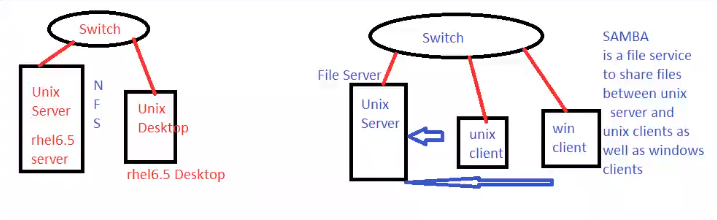
Prerequisite for Networking: Configure hostname & tcp/ipv4
Steps to Configure and Setup any Service in Linux
- Install packages required for that service
- Start the service
- Do the configurations
- Restart the service
- Start the service on boot
- Allow the service in the firewall
NFS
Exercise:
Configure a rhel6.5 server with server name srv1.test.com and IP Address 10.0.0.3/8 . Configure a rhel6.5 Desktop with name pc1.test.com and IP Address 10.0.0.101/8 . On the server create a folder called Development and share it using NFS to all client PCs.
Note: NFS package is installed by default
Steps on Server
$ vi /etc/sysconfig/network
	HOSTNAME=srv1.test.com   # reboot after this
$ vi /etc/sysconfig/network-scripts/ifcfg-eth0
	ONBOOT=yes
	IPADDR=10.0.0.3
	NETMASK=255.0.0.0
	BOOTPROTO=dhcp         # remove this line
$ service network restart
$ ifconfig -a
$ service nfs status
$ service nfs start
$ mkdir /Development
$ vi /etc/exports
	/Developemnt *(rw,sync,no_root_squash)
$ exportfs -rv                 # share /Development folder
$ service nfs restart          # restart the service
$ chkconfig nfs on             # enable start on bootup
$ service iptables stop ; setenforce 0     # stop firewall temporarily
Steps on Client
$ vi /etc/sysconfig/network
	HOSTNAME=pc1.test.com
$ vi /etc/sysconfig/network-scripts/ifcfg-eth0
	ONBOOT=yes
	IPADDR=10.0.0.101
	NETMASK=255.0.0.0
	BOOTPROTO=dhcp         # remove this line
$ service network restart
$ ifconfig -a
$ ping 10.0.0.3
$ mkdir /Development
$ vi /etc/fstab
	10.0.0.3:/Development   /Development   nfs   defaults  0 0
$ mount -a
$ df -h | grep Dev
$ cd /Development
$ touch file1
$ mkdir sample1
# Check server to see if files are created or not
To Permanently Disable Firewall
$ chkconfig iptables off
$ vi /etc/selinux/config
	SELINUX=permissive
Samba
Steps to Install and Configure Samba
-
Ensure that server and windows client can ping each other
-
On the server, mount the DVD to packages folder
$ mkdir /packages $ mount -t iso9660 -o ro /dev/cdrom /packages $ df -h -
Install Samba using RPM not YUM
$ cd /packages/Packages $ rpm -ivh samba-3-.... -
Start the samba service
service smb start -
Share a folder called
/Devopsfor a user callednewuser$ mkdir /Devops $ useradd newuser -p 123 $ chown newuser /Devops $ chmod 700 /Devops -
Do the samba configuration:
$ smbpasswd newuser -a # create same user in samba database $ vi /etc/samba/smb.conf [Devops] path = /Devops valid users = newuser writable = yes $ testparm $ service smb restart -
Steps on the client:
- Configure IP Address on the Windows PC
- Make sure you can ping the server
- Run
\\10.0.0.3- Two folders are available. One is the /Desktop folder
- The other is the home directory of user
newuser